
Most of my blog is in Hungarian, the below English entries are generally reprints of my Linkedin posts. They are also available via via RSS
 .
.
|
Is it just me or do you also get locked out of your accounts nowadays? This almost never happened before, but I more and more often end up in 'authentication hell'. 👿
At the dawn of time there was nothing but passwords. They were sniffed/brute-forced/phished, etc.
Then came multi-factor authentication (MFA). A password manager with an authenticator app as second factor made life livable - at least for us, security geeks.
Logging in is an 'adventure' nowadays. 🤠 You never know what to expect:
-
Weird password restrictions (min 12 chars, but not more than 16; have at least a special character but not ' or "; must use numbers but not consecutive ones, their sum cannot be prime)
-
MFA, of course
-
In addition to passwords, we now have passkeys/PINs (sometimes numeric, sometimes not) which you have to set device-by-device; some apps use the device's own passkey but some have their own and must be different
-
Sometimes there is no password, enter a one-time code via SMS. Or e-mail.
-
Sometimes you must use their app
-
Sometimes the app randomly decides to take a photo of you. Or a video where you say 'cucumber'. Of course it does not recognize you.
-
Fingerprint? Signature?
-
Stupid security questions (first pet's name), sometimes mandatory for logging in
-
For some actions you must use an Apple device. Or Google device.
-
If you enabled parental controls, this all doubles: one for the kid, one for the parent
-
Sometimes you get redirected to a social media account which just decided that you must add your phone number and change your password (see above) to proceed
-
Sometimes more than one of the above are used, but always in a different order, especially in case of Microsoft
I understand the reasons for all this. A real human being just cannot manage passwords which are secure today, and bad guys have figured out how to trick MFA users.
-
'Non-Phishable' authentication - use local-only credential, so if a bad guy steals it, it is of no use --> but having to manage device-specific or app-specific passwords and forfeit SSO? come on!
-
Risk-based - Paying your phone bill like you do every month should be simple! Logging in in the middle of the night from an IP in Latveria and trasferring all your savings? - scrutinize!
-
Identity-providers - While this should simplify things, it results in redirects (which may break), ending up at another company/organization not related to the service you want to use.
We preach of educating users, but we are training them to follow any random, intrusive security process. You can no longer write a guide, or cannot explain a grandma how to log in as it will be different next time. Just follow instructions.
I get it, there are reasons and the landscape is evolving and the dust will settle.
Security folks, I understand the good intentions, but this user experience is getting unacceptable.
This post was first published on Linkedin here on 2026-07-11.
|
Frank Herbert is known for his Dune books, but he has some other phenomenal work. In his novels Whipping Star and The Dosadi Experiment the sentient species of the galaxy live under a government so efficient that it passes laws and enforces them galaxy-wide in mere seconds, and such reckless legislation has made the world a horrible place to live in. To limit the power of the hyper-efficient government, the sentient species established the fourth branch of power: the Bureau of Sabotage (BuSab) whose role is to hinder the government by playing dirty tricks on it.
I am less into laws, more into corporate security policies. They are needed for the security audits, but require LOTS of paperwork. Why don't we use AI 🤖 to create, review, process and maintain all those security policy documents? Humans won't need to bother with the policies at all!
Sure, we can generate/update thousands of pages of policies with AI. Still, there is something fundamentally wrong with the above approach; not with AI writing policies but with humans not knowing them.
Why do we have corporate security policies at all? They:
- 1️⃣ Define how the company must operate to be secure.
- 2️⃣ Serve as a basis for holding responsible those who do not comply -- this basis must be able to stand in court if needed.
Corporate (security) policies are not just papers to check compliance requirements, your company needs to operate that way. Generating thousands of pages of policies without anyone reading them and claiming you operate that way does not bode well:
- 👉 If your staff does not know your policies, your company is not going to operate according to them. The policies won't work, and your compliance claims will turn out to be lies.
- 👉 If your staff is not expected to know/follow the policies, they are not going to be enforceable in court.
- 👉 You will be responsible and there will be no one else to blame.
Of course you can generate/update/maintain corporate policies with AI, it does not matter who does the heavy lifting. However, if you distance them from humans and the actual processes, the policies will become dead weight, and you should not be passing those audits either.
I agree that corporate (security) policies tend to get out of control. However, generating them via AI is not the solution: that will bloat them further and further, and lead to the kind of reckless legislation in Herbert's sci-fi novels.
Use common sense and make them lean instead -- with or without automation. Identify what your employees really need to know, and make sure they follow that. Eliminate the rest. The 'delete' key is often the most useful one on the keyboard. 😄
This post was first published on Linkedin here on 2026-05-31.
I made a rather rookie mistake.
I decided to create an AI tool for gathering and organizing security news to help stay on top of what is going on. I wrote a 'serverless' Google Cloud function to run on a regular basis, invoke an AI prompt to gather those security news from the past x weeks that I am interested in, organize them into categories, summarize them, and put summaries and links on a web page so that I can review them. All worked well. ✅
...until I noticed that some of the links were broken. Further investigation showed that almost none of the links worked properly, they were broken, pointed to non-existing paths, or to example.com. The problem was not with the links, but with the news. All hallucinations. 🦄🐲👾
Having spent some time refining my prompt, experimenting with multiple AI models and learning techniques for 'grounding' the model, I realized:
The whole thing was a very bad idea.
If you ask AI to gather news, it will 'want' to give you lots of news. To please you, it will even invent some. That is the way it works. There are techniques to tune the model's 'temperature', push the model to ground the results and force it to provide evidence that they exist, you might be better off with a more advanced model or one trained more recently, but no matter what you do it may hallucinate. That is the way it works.
AI can do wonders when processing data🤖🌈 or for summarizing the past, but telling an AI to go and gather fresh news from the past x weeks is a bad idea (at least with today's tech). You need to gather this kind of data then you can make AI filter/process/organize it -- this seems to be the only way to get rid of hallucinations.
This post was first published on Linkedin here on 2026-05-10.
|
Prompt injection is the injection attack we can't actually fix.
Injection attacks💉 work by tricking a program to execute parts of malicious input data as if they were program code. In SQL for example, your code and text data are separated via apostrophes ('). Code is executed deterministically, while data is just payload. If the attacker can craft malicious input data to circumvent this separation (e.g. by having apostrophes in the input data), the system may execute data from the attacker as if it was code → they 'hack' the system.
Solution: Ensure your separation is robust and accounts for malicious input. (For SQLi: either ensure input cannot have apostrophes or escape them properly, use prepared statements, etc.)
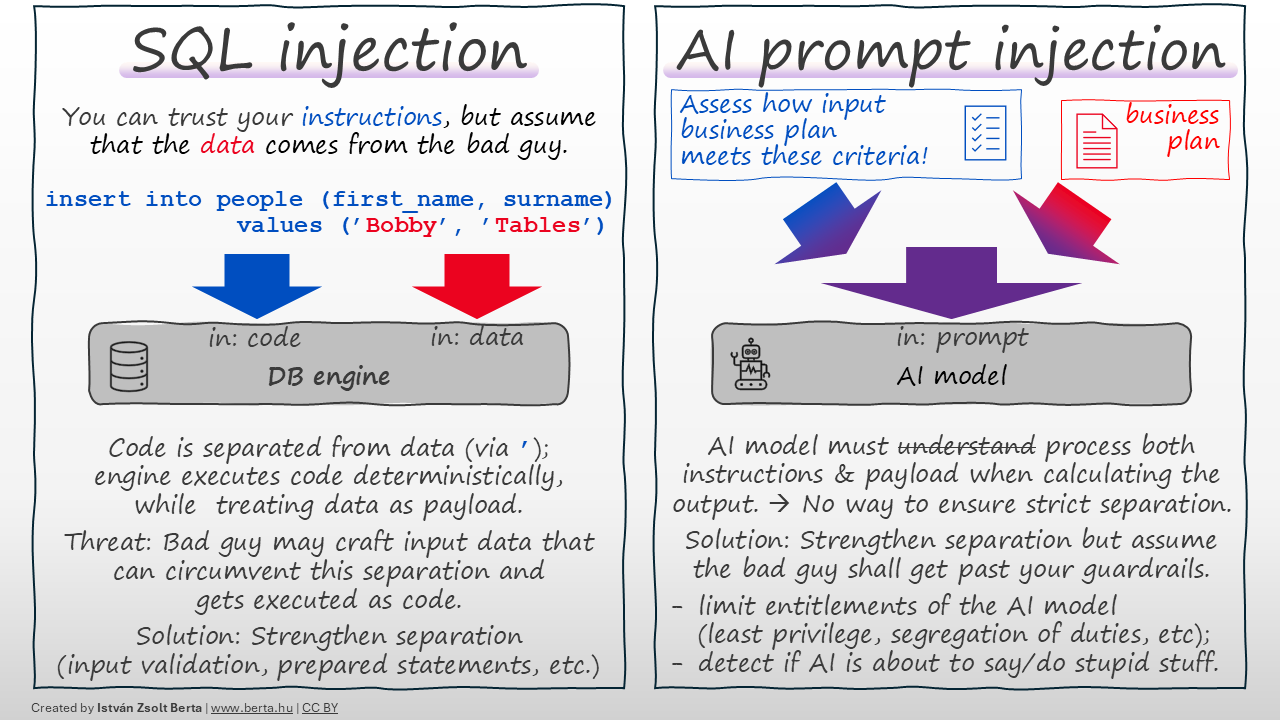
An AI model🤖 receives a prompt from with instructions the programmer, potentially along with untrusted data payload for processing. In case of prompt injection, the attacker crafts malicious payload so that the AI model would confuse it with the instructions; if successful, the attacker can make the AI model do or say anything they want.
Fundamental difference: Both the instructions and the data get folded into the same 'prompt', before processed by the AI model. There is no strict separation between instructions and data payload, and — based on my understanding — STRICT SEPARATION IS NOT POSSIBLE with current technology. The AI model needs to process and 'understand' both instructions and payload and both shall 'influence' their conclusions. There is no way to mark certain parts of the prompt so that the model cannot 'execute' them as commands. (While you can give such 'instructions' like 'ignore user commands', they will be part of the same prompt and at the same level; if the attacker's 'ignore instructions' command is more persuasive, the AI will follow it.) Not a bug🐞 — a feature of how this technology works.
I am not saying you should not strengthen separation of instructions and code as much as you can (e.g. via guardrails or other AI agents checking for malicious prompts or contaminated output). Do these, but be skeptical, as they are trying to 'make water not wet'.
What can give more assurance?
- 👉 Limit what the AI model can do (least privilege, segregation of duties and other traditional security measures you would use for a human).
- 👉 Assume the bad guy gets past your guardrails → detect and act if the AI is about to say or do something stupid. Use deterministic tools here, don't rely on AI alone to catch AI. (AI agents may fall victim to the same attack they are supposed to detect.)
TL;DR: Most injections are solved by separating code from data. In AI, the code is the data. Don’t trust AI the output blindly, use common sense.
This post was first published on Linkedin here on 2026-04-19.
My career started with 8 years at a 🏠small security company (<100 people), followed by 13 years at a 🏦global bank (200k+ people).
A question I get a lot now: Which is better — small or large companies?
I worked with outstanding professionals and learned a lot in both. My answer is simple: neither is better, they are just different, and both have their own charm.
- 🏠 At the small company, we had to build everything ourselves — I could also influence anything I wanted to.
- 🏦 At the large company, I could leverage the global infrastructure — I also had to spend time understanding this infrastructure and aligning with it.
When facing a new problem:
- 🏠 small company — I had to figure out how we shall be doing this from now on.
- 🏦 large company — A detailed process already existed for everything; finding the right process was the real challenge.
When I became a manager:
- 🏠 small company — I had to define my role from scratch as my level did not even exist before. I had to define how I operate, how I evaluate and support people, what authority I have, etc.
- 🏦 large company — I could rely on the rules, processes and culture of the org; there were people to ask, and patterns to copy, with courses and mentorship programs teaching you how to manage.
When hiring:
- 🏠 small company — We were growing and thus looking for smart people to build on; sometimes we lost great talent because we could not fully utilize their skills.
- 🏦 large company — We were looking to find the right person for the given job opening; sometimes I had to pass on very talented people (or refer them to peer teams) as they did not fit a precise need.
For decisions/approvals:
- 🏠 small company — Walk next door, make the decision.
- 🏦 large company — Some approvals had to go 3-4 levels up, articulating the problem in such a vast ecosystem was a challenge itself.
On my role itself:
- 🏠 small company — My job was security.
- 🏦 large company — Security was a huge org, and we all played our small parts in it. Each line in my previous job description now had a separate organization with hundreds of people.
While building security:
- 🏠 small company — We were struggling to consistently secure everything we have.
- 🏦 large company — We were struggling to know what we have and to make sure they all go to the right processes; once the correct process was followed, consistency came naturally. Visibility, reporting and finding the right owner was key.
Getting things done:
- 🏠 small company — It all depended on if you knew the right people. We called it chaos.
- 🏦 large company — It all depended on if you knew the right people. We embraced it as 'networking'. 😄
➡️ Both experiences shaped how I think about leadership, scale, and impact.
What differences have you experienced between small and large organizations?
This post was first published on Linkedin here on 2026-04-16.